



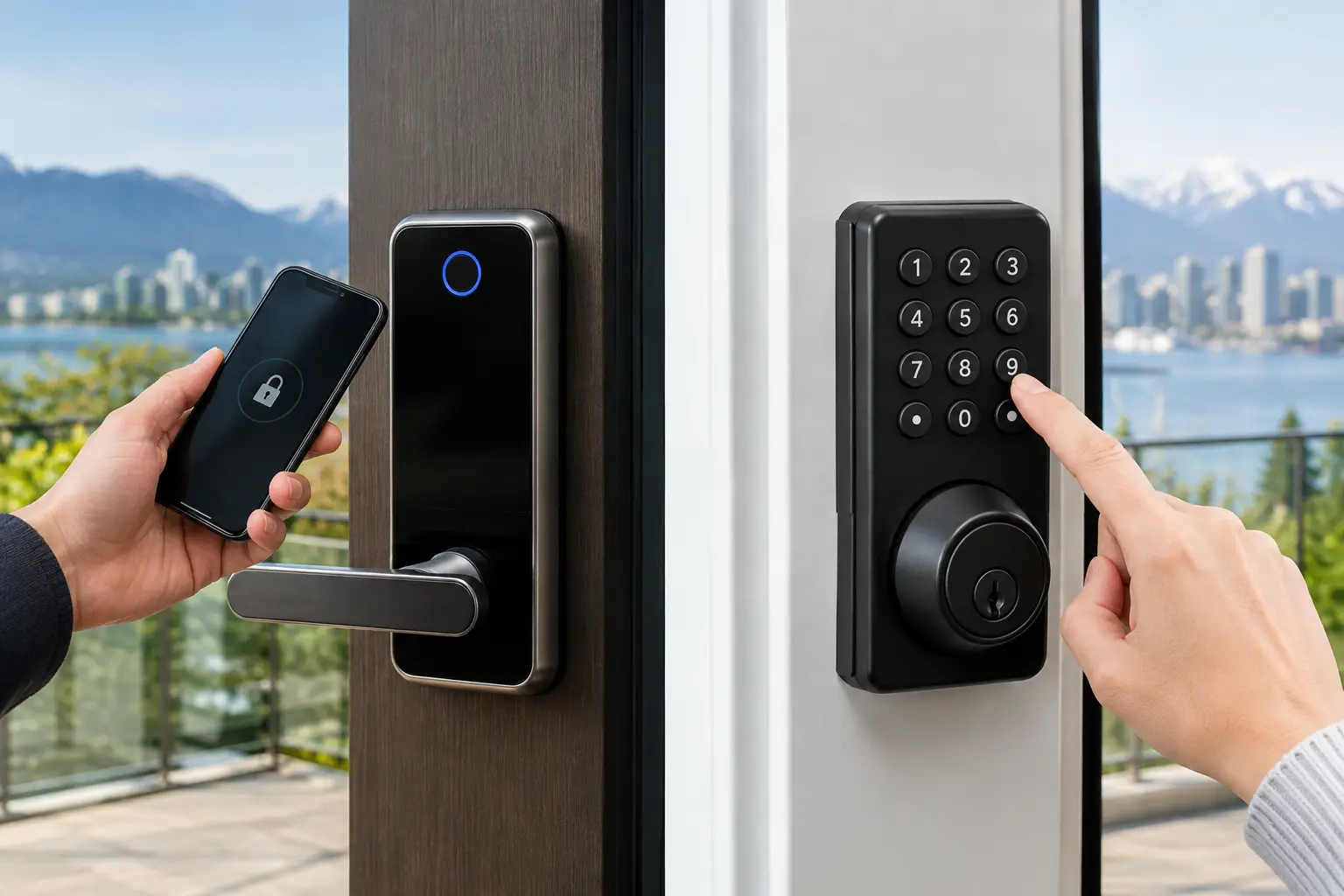
A key left inside the house, a tenant who needs access after hours, or a shop manager tired of collecting spare keys can all lead to the same question: smart locks versus keypads, which is the better choice? The answer depends less on technology and more on who uses the door, how often access changes, and what happens when the power or battery runs low.
For homes and businesses across Vancouver and the Lower Mainland, a well-chosen lock should make daily entry easier without creating a new point of failure. A professional locksmith can assess the door, existing hardware, user needs, and emergency backup options before installation.
Smart Locks Versus Keypads: Know the Difference
The comparison can be confusing because many smart locks include a keypad. A keypad lock is usually an electronic lock opened by entering a PIN code. It may have no app, no Wi-Fi connection, and no remote controls. Its purpose is simple: replace or supplement a physical key with a code.
A smart lock has connected features. Depending on the model, it may be controlled by a phone app, Bluetooth, Wi-Fi, a fob, fingerprint reader, or voice assistant. Some allow temporary access codes, activity logs, remote locking, and notifications when a door is used. Many smart locks also have a physical keypad, so this is not always an either-or decision.
The practical choice is often between a basic keypad deadbolt and a connected smart lock with keypad access. Both can improve convenience. The right option comes down to the level of control you need and how much technology you are comfortable maintaining.
When a Keypad Lock Is the Better Fit
A standalone keypad lock is a practical choice for people who want code entry without relying on an app or internet connection. You enter the code, turn the thumbturn or lever, and the door opens. There is very little to manage once it is installed correctly.
This can work well at a family home where children arrive before their parents, a rental suite with a small number of occupants, or a business staff entrance where access rarely changes. It also suits owners who do not want to depend on a smartphone for daily entry.
Keypad locks have another advantage during internet outages. A basic electronic keypad continues to work because it does not need Wi-Fi. Most are battery powered and will warn users when battery levels are low. Many models also include a key override, though homeowners should confirm this before choosing a lock. A key override provides a useful backup when a battery dies or an electronic component fails.
The limitation is control. If you give the same code to several people, you cannot always tell who entered or when. Changing a code is easier than rekeying a traditional lock, but it still requires someone at the property to update it. For a busy rental, office, or retail location, that can become inconvenient.
When a Smart Lock Makes More Sense
Smart locks are built for changing access needs. A homeowner can issue a temporary code to a dog walker or contractor. A property manager can remove access for a former tenant or maintenance provider without collecting keys. A business owner can assign individual codes to staff rather than sharing one code across the entire team.
Activity records can also be useful. They do not replace proper security procedures, but they can show whether a code was used at a particular time. For landlords and managers handling multiple units, remote access management can reduce key handoffs and last-minute trips across the Lower Mainland.
A smart lock is especially useful when you are away from the property regularly. You may be able to check whether the door is locked, lock it remotely, or provide time-limited access from your phone. These features are convenient, but they also create responsibilities. The lock needs reliable batteries, secure account settings, software updates when available, and a backup entry plan.
Not every smart feature needs Wi-Fi. Bluetooth locks often work directly with a nearby phone, while Wi-Fi-enabled locks support remote control from farther away. Before buying, consider which features you will actually use. Paying for remote access makes little sense if you only want a simple code for the kids after school.
Security Depends on More Than the Lock Type
Neither a smart lock nor a keypad automatically makes a door secure. The deadbolt quality, strike plate, door frame, screws, hinges, and installation all matter. A connected lock on a weak door frame will not fix the underlying security problem.
For exterior doors, choose a lock designed for residential or commercial use rather than a lightweight interior privacy lock. The hardware should fit the door thickness and backset correctly. If the door has a multipoint locking system, narrow stile frame, glass panel, or unusual bore hole, standard smart lock installation may not be straightforward.
Code management matters too. Avoid obvious PINs such as a birthday, street number, or 1234. Do not share one code with everyone who needs access. Separate codes make it easier to remove access when circumstances change. For smart locks, use a strong account password and enable additional account protection where the manufacturer offers it.
Commercial properties should also consider employee turnover, public access, and fire safety requirements. Some doors require specific panic hardware, access-control components, or rated locking hardware. Installing the wrong device can interfere with safe exit or create compliance concerns. A locksmith can help determine whether a standalone keypad is appropriate or whether the property needs a commercial access-control solution.
Batteries, Weather, and Backup Entry Matter in BC
Electronic locks need power. Most use standard batteries, and low-battery warnings should be taken seriously. Do not wait until the lock stops responding. Replace batteries on a regular schedule and keep the emergency backup method available.
Vancouver's wet weather is another consideration. Exterior hardware should be rated for outdoor exposure, and the door should close and latch properly before any electronic lock is installed. Moisture, misalignment, swelling wood, and a loose strike plate can make any lock harder to operate.
A backup plan should be part of the purchase decision, not an afterthought. Depending on the model, that may mean a physical key, an emergency battery contact point, a second door with conventional hardware, or a trusted person with access. If you are locked out or the lock has failed, NOW LOCKSMITH provides 24/7 locksmith support across Vancouver and surrounding Lower Mainland communities.
Installation Can Make or Break the Result
Many residential smart locks are marketed as do-it-yourself products, but installation is not always as simple as replacing a deadbolt. The bolt must line up cleanly with the strike. The door cannot sag, bind, or require force to close. Electronic locks are less forgiving of alignment problems because the motor must throw and retract the bolt reliably.
Before selecting hardware, measure the door thickness, backset, existing bore holes, and clearance around the deadbolt. Check whether the interior portion of the lock will interfere with a screen door, storm door, decorative glass, or narrow trim. For condos and rentals, review strata rules or lease requirements before changing exterior door hardware.
A locksmith can correct alignment issues, reinforce weak strike areas, rekey compatible backup cylinders, and install the lock so that it operates smoothly. This is often more valuable than choosing the most expensive model on the shelf.
Choose the Lock Around the People Using It
Choose a basic keypad when you want dependable code entry, limited complexity, and a straightforward replacement for spare keys. Choose a smart lock when access changes often, remote control would solve a real problem, or you need individual codes and activity records.
For many households, the best balance is a smart deadbolt with a keypad, physical key backup, and only the connected features they will genuinely use. For a small business, separate staff codes and a clear process for removing access may matter more than phone control.
The best door lock is the one that your household, tenants, or staff can use confidently every day - and that still gives you a reliable way back in when plans change.